You can check your prepaid gift card balance in about a minute using the website, phone number, or text option printed on your card.
To check your prepaid gift card balance, visit the balance-check website printed on your card. Enter your 16-digit card number, expiration date, and CVV.
You can also call the phone number on the card. Both methods are free and show your available balance instantly.
Prepaid gift cards run on either the Visa or Mastercard network. The balance-check website depends on which company issued your card, so the correct address is the one printed on the card itself.
Every balance check asks for the 16-digit card number and 3-digit CVV. Under the Credit CARD Act of 2009, the money on a gift card stays valid for at least five years from purchase. After 12 months of no use, issuers can charge an inactivity fee that lowers the balance.
Only type your card details into the exact web address shown on your card. Fake balance-check sites copy real ones and can drain your funds.
The steps below cover checking, activating, and registering both Visa and Mastercard gift cards, plus the fees and safety rules worth knowing.
What prepaidgiftbalance Actually Means (and Who Issues Your Card)?
People type prepaidgiftbalance into search when they want one thing: the money left on their card. It is a search habit, not a single official website.
Your gift card is not made by Visa or Mastercard directly. A bank or program manager issues the card. That company also runs the balance-check website.
Companies like InComm, Blackhawk Network, Green Dot, and Pathward issue many of the prepaid gift cards sold in US stores. Each one runs its own portal. This is why the correct web address is printed on the back of your card.
A gift card is a type of prepaid card. A prepaid card is a type of payment card. Knowing this helps you spot the right customer service line when a card gives you trouble.
Match the exact URL on your card before you enter anything. One wrong letter can send you to a copycat site built to steal card numbers.
Visa vs. Mastercard Prepaid Gift Cards — What’s Different
For checking your balance, a Visa gift card balance and a prepaid gift balance Mastercard work almost the same way. Both need your card number, expiration date, and CVV.
The difference sits behind the scenes. Visa and Mastercard are payment networks that process your purchases. The network logo tells you which one authorizes the store transaction.
Sometimes the two networks use different balance-check portals. A Visa card and a Mastercard card from the same store can point to separate websites. Always read the address on your own card instead of guessing.
Both card types place a temporary authorization hold at gas stations and hotels. This hold lowers your available balance for a few days before it clears.
How to Check Your Visa Card Balance Online at prepaidgiftbalance com?
Checking online is the fastest way to see your available balance. It costs nothing and takes under a minute. Follow these steps for a www prepaidgiftbalance com visa card balance check
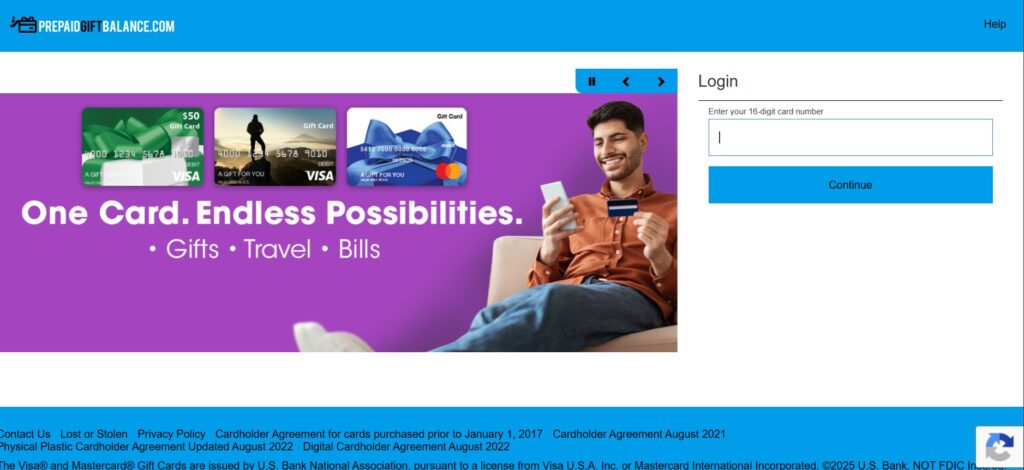
- Find the balance-check web address printed on the back of your card.
- Type that exact address into your browser. Do not rely on a search result link.
- Enter your 16-digit card number.
- Enter the expiration date.
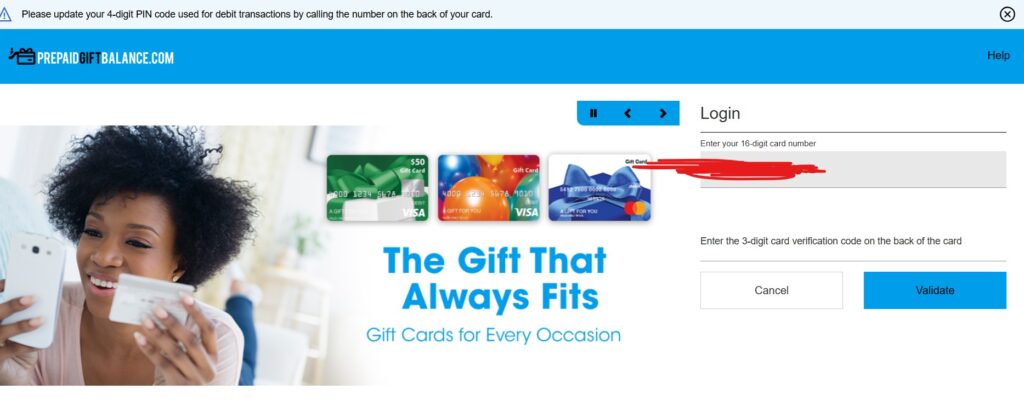
- Enter the 3-digit CVV from the signature strip.
- Add the billing ZIP code if the site asks for one.
- Select Check Balance to see your current amount.
The screen shows your available balance and, on most portals, your recent transactions. Keep a note of the balance before you shop, so a purchase does not get declined at the register.
Never enter these details on a page you reached through a random email or ad. The only address you should trust is the one on the physical card or its paper insert.
Www prepaidgiftbalance com Mastercard Balance Check
A www prepaidgiftbalance com Mastercard balance check follows the same path.
The fields are identical. card number, expiration date, and CVV.
Open the web address printed on your Mastercard gift card. Enter the 16 digits, the expiration date, and the CVV. Select the balance option to view your funds.
Your card status matters here. A card can show as active, inactive, or expired. An inactive card often returns an error until you activate it first.
Some Mastercard portals also ask you to set a PIN. The PIN lets you use the card at stores that require one. Write it somewhere safe, not on the card.
Why Your Balance May Show Zero or Card Not Found
A zero balance or “card not found” message usually points to a simple cause. Check these first before you call support.
The card may not be activated yet. New cards often need activation before the system recognizes them. A recent purchase may also sit as a pending hold, which lowers the number you see.
Wrong entries trigger errors too. Double-check that the card number, expiration, and CVV match the card exactly. An expired card will also fail, since the funds may have moved or lapsed.
How to Check Your Prepaid Gift Card Balance by Phone or Text?
No internet? The phone number on your card works just as well. Call the toll-free number printed on the back.
An automated system answers. It asks you to enter your 16-digit card number using the keypad. It may also ask for the expiration date or CVV. Listen for the “balance” option, usually the first menu choice.
If the automated line cannot find your card, press the option for a live agent. Have the card in hand so you can read the number and expiration aloud.
Some issuers also offer a text option. You usually register the card first, then text a keyword to a short code. Standard message and data rates apply from your carrier.
Text and phone checks verify the same available balance as the website. Pick whichever is easier when you are away from a computer.
How to Activate Your Card? Prepaidgiftbalance com Mastercard Activate Card
Most gift cards need activation before you can spend or, sometimes, even check the balance. A www prepaidgiftbalance com Mastercard activate card step turns the card on.
Activation exists to protect you. It stops a stolen card from being used before it reaches the buyer. Retailers activate many cards at the register during purchase, but some still need you to finish the step.
To activate your card, follow the steps.
- Visit the web address on the card or call the activation number.
- Enter your 16-digit card number.
- Enter the expiration date and CVV.
- Confirm the purchase amount if the system asks.
- Set a PIN if prompted.
Once the card status changes to active, you can spend the balance and shop online. An inactive card will decline at checkout every time.
Activate Then Check — Visa Activate Card Balance Check in One Flow
A www prepaidgiftbalance com visa activate card balance check works best as one smooth sequence. Activate first, then confirm the funds landed.
Open the portal and activate the Visa gift card using the steps above. Right after the card status turns active, select the balance option on the same site.
You should see the full purchase amount as your available balance. If the number looks low, a fee or a pending hold may explain the gap. Checking straight after activation catches any problem early.
How to Register Your Card? prepaidgiftbalance com Register Your Card
Registration adds your name and address to the card. A www prepaidgiftbalance com register your card step links the card to your billing details.
Here is the point most people get wrong. You usually do not need to register just to check a balance. Registration matters for online and phone purchases, where the store verifies your billing address.
To complete a prepaid gift balance register Visa step.
- Go to the web address on your card.
- Select the register or “personalize” option.
- Enter your card number, name, address, and ZIP code.
- Save the details.
Registration also adds a layer of fraud protection. Some issuers help replace a registered card if it is lost or stolen. An unregistered card offers far fewer options if something goes wrong.
Note that “register” here means recording your card details online. It has nothing to do with a store cash register.
Do You Have to Register to Check Your Balance?
No, you usually do not. Checking your balance needs only the card number, expiration date, and CVV. Registration is a separate step.
You do need registration for online shopping. Websites match the billing ZIP on file against the address you type at checkout. Without a registered ZIP, an online order can fail even with money on the card.
For in-store swipes and balance checks, skip registration if you prefer. Register only when you plan to shop online or want lost-card protection.
Using Your Remaining Balance (and Avoiding Surprises)
Your available balance equals the starting amount minus your purchases and any fees. Spending down to the last dollar takes a little planning.
Online, enter the billing ZIP you set during registration. In stores, swipe the card like any debit or credit card. Choose “credit” if the terminal asks and you have not set a PIN.
A common problem hits when your purchase costs more than your balance. Many registers reject the card instead of taking a partial payment. Ask the cashier to charge the exact card balance first, then pay the rest another way.
You can also add many gift cards to Apple Pay, Google Wallet, or PayPal. Watch out for subscriptions, since a recurring charge can decline once the balance runs low.
Fees, Expiration, and Your Rights
Prepaid gift cards can carry fees that shrink your balance over time. Knowing them helps you use the full amount.
Common charges include a one-time activation fee, a monthly inactivity fee, and a replacement fee. The card’s terms list every fee. Read the paper insert or the cardholder agreement online.
The Credit CARD Act of 2009 protects you here. Gift card funds stay valid for at least five years from the purchase date. Issuers cannot charge an inactivity fee until the card sits unused for 12 months, and then only one fee per month.
The Consumer Financial Protection Bureau (CFPB) oversees these rules. If a fee or expiration looks wrong, you can file a complaint with the CFPB. Keep your receipt and the card details as proof.
Staying Safe From Fake Balance-Check Sites
Scammers build websites that copy real balance-check pages. They rank in search and wait for you to type in your card number. Then they drain the funds within minutes.
Protect yourself with three habits. First, type the web address directly from your card instead of clicking search or email links. Second, check that the page uses “https” and matches the card’s URL exactly. Third, never share your card number, CVV, or PIN by phone or message unless you started the call.
If a card is drained, act fast. Call the issuer number on the card and report it. File a complaint with the CFPB and, if a scam is involved, report it to the Federal Trade Commission. Registered cards are easier to trace and, in some cases, replace.
FAQ
Is prepaidgiftbalance com the official site?
Not always. “Prepaidgiftbalance” is a search phrase, and lookalike sites exist. The only address to trust is the one printed on your own card. Match it letter for letter before entering details.
Do prepaid gift cards expire?
The plastic card shows an expiration date, but the money lasts longer. Under the Credit CARD Act, funds stay valid for at least five years from purchase. Ask the issuer for a free replacement if the card lapses.
Do I need to register to check my balance?
No. Balance checks need only your card number, expiration date, and CVV. Registration is for online purchases and lost-card protection, not for viewing your funds.
Why is my card declining with money on it?
Common causes include a pending authorization hold, an unactivated card, or a purchase larger than your balance. Online orders can also fail if the billing ZIP does not match.
Can I check my Visa gift card balance without going online?
Yes. Call the toll-free number on the back of the card. An automated system reads your available balance after you enter the card number.
What is a CVV and where do I find it?
The CVV is the 3-digit security code. You find it on the signature strip on the back of the card. Every balance check and online purchase needs it.